PR comments
Post a run summary on the GitHub PR or GitLab MR straight from CI: pass/fail, tests newly failing vs the base branch, one click to the trace.
Playwright ships a great report for a single run. kinora sits one level up: push every CI run, from Playwright, Vitest browser mode or Storybook, and get one place to track pass rates, spot trends, surface flaky tests, and open the full trace inline.

[ Features ]
Push from CI and kinora keeps the history. Pass rate, run count, and duration per project, with a sparkline trend and one colored strip per run, so a slow drift is obvious long before it breaks the build.

The share of passed, flaky and failed results over the last 30 or 90 days, per day or per week, for every branch or just one. A flaky rate creeping up shows here weeks before anyone complains about CI.

Playwright only calls a test flaky when it passes on a retry. kinora also catches the ones that pass and fail on the same commit, or keep flipping from one run to the next, and tells them apart from broken tests: the ones that fail and keep failing since a commit. Each badge says why.

Each test keeps a stable identity regardless of how it was uploaded, so you can track one test run-to-run: when it started flaking, when it was fixed, and how long it has been green.

Pick any two runs and kinora groups every difference for you: newly failing, fixed, newly flaky, and still failing. No more diffing two HTML reports by eye to find the one test that regressed since green.

Storybook stories run by Vitest and Playwright component tests are grouped by component and story, each with its status and history. See at a glance which component regressed and which story keeps flaking, then open the tests behind it.

kinora reads the axe scans of your Playwright tests and of your Storybook stories: the rules broken, their impact, the elements they hit. Hotspots rank your test files and components by their violations, critical ones first, so you know where fixing pays off.

[ Trace viewer ]
Failing tests get a View trace button that opens the full Playwright trace inline, DOM, timeline, network and console, no download, no separate tooling. The replay engine is vendored straight from Playwright, so it is the viewer you already know.
No account. The file stays in your browser.

[ Desktop app ]
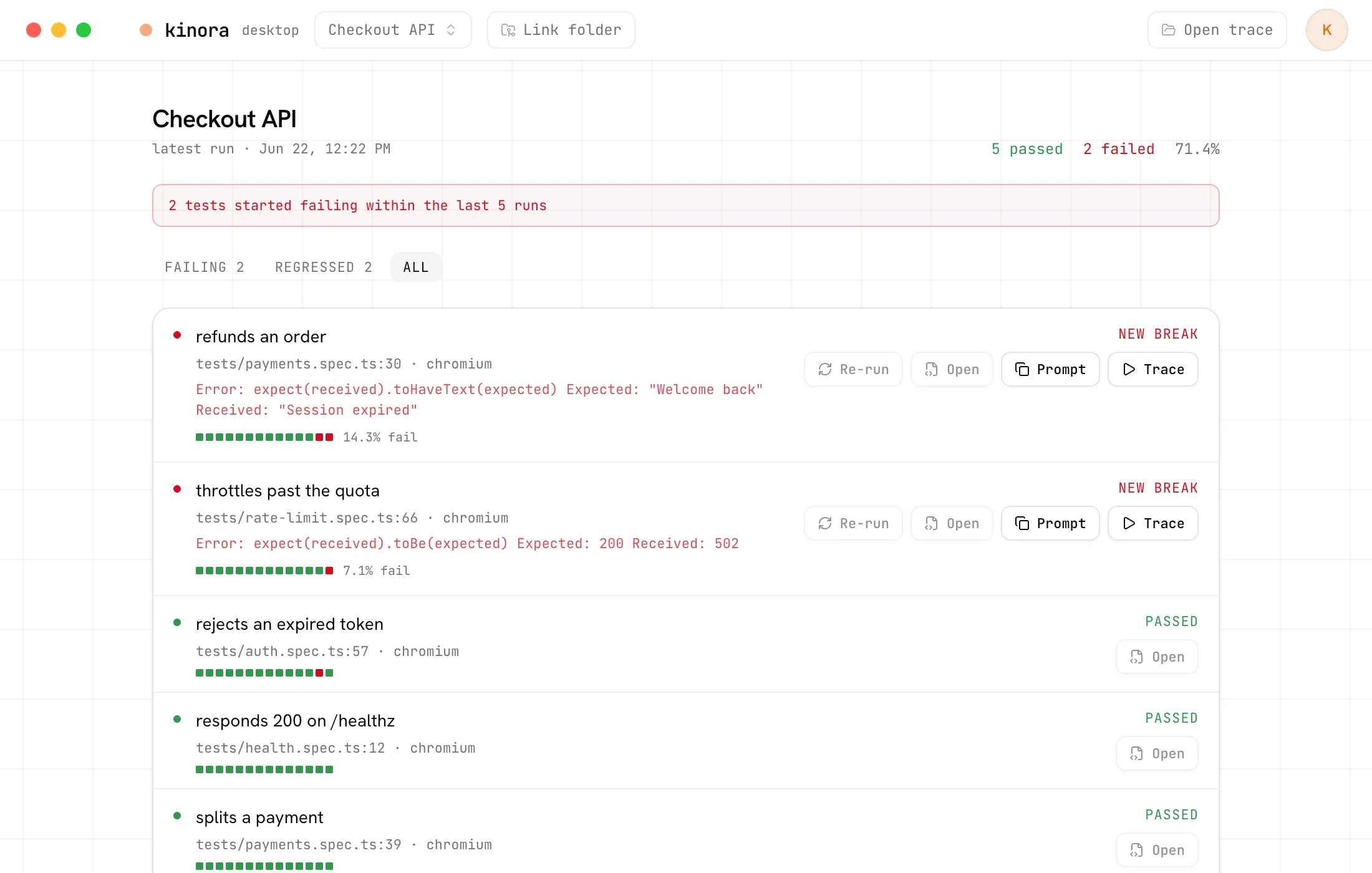
The kinora desktop app signs into your account and opens straight on the latest run's failures. Re-run a failing test locally with your repo's own Playwright, jump to thesource in your editor, copy a ready-to-paste AI prompt, or open the full trace inline. It also opens any local trace.zip with no account at all.
[ Coding agents ]
Copy-paste was step one. Point Claude Code, Cursor or any MCP client at kinora and it pulls the failing test, its trace and flaky history straight into the chat, then works the fix. Runs locally over stdio, against the cloud or your own self-host.
Read the docs →{
"mcpServers": {
"kinora": {
"command": "npx",
"args": ["-y", "@kinora/mcp"],
"env": { "KINORA_TOKEN": "<token>" }
}
}
}list_failuresthe last run's failures, with error and file:lineget_tracethe Playwright trace for any failing testtest_historyflaky or broken, and why, per testcomponent_healtheach story's health and accessibility violationslist_projectsevery project and its latest runget_runthe full report for a single run[ And the rest ]
Post a run summary on the GitHub PR or GitLab MR straight from CI: pass/fail, tests newly failing vs the base branch, one click to the trace.
Slice the overview by branch or tag to compare main against a feature branch, or smoke against nightly.
Auto-upload at the end of every Playwright or Vitest run, or push an existing results.json from a separate CI job. Same data either way.
A test keeps the same key across runs and ingest paths, so its history never silently breaks.
A failed visual assertion shows its expected, actual and diff images side by side, on the run and in the test's history.
Your results stay on your own box. FSL server and dashboard, MIT client libraries you embed.
[ Setup ]
The reporter is the quick path. Prefer to upload an existing results.jsonfrom a separate job? The CLI does the same, and both share @kinora/coreso a test keeps a stable identity across runs and ingest methods.
Paste this into Claude Code, Cursor, or any agent. It reads the setup doc and wires the reporter into your config.
Set up kinora test reporting in this repository.
Read https://kinora.dev/llms/setup.md and follow it.One line in your Playwright config. It auto-uploads at the end of every run.
export default defineConfig({
  reporter: [['@kinora/reporter', { project: { slug: 'web-app' } }]],
  // enable tracing so View trace works
  use: { trace: 'on-first-retry' },
})Pass a project token by env, kept out of the config and in CI secrets.
KINORA_TOKEN=<token> npx playwright testPass rates, trends, flaky tests and full traces land in kinora, one strip per run.
[ Pricing ]
Self-host free, forever. Or let us run it: every cloud plan has unlimited seats, so the whole team watches without counting logins. You pay for test results, not people.
The full dashboard and embedded trace viewer, FSL-1.1, on your own infrastructure. Unlimited everything, no account needed.
Try kinora cloud on a side project.
For teams shipping on CI every day.
10k results included, then $5 / 1k
Start freeFor heavy CI and longer history.
50k results included, then $4 / 1k
Start freeFor scale and compliance needs.
A test result is one test in one run.
[ FAQ ]
kinora is an open-source dashboard for Playwright test reports. It collects results from every CI run and tracks pass rates, trends, and flaky tests across projects and over time, with the full Playwright trace viewer embedded inline for failures.
Playwright's HTML report covers a single run on one machine. kinora sits one level up: it ingests every run from CI, keeps history, and lets you compare runs, watch pass-rate trends, and detect flaky tests over time. The trace viewer is the same one you know, embedded directly in the dashboard.
Yes. You can self-host the full dashboard and trace viewer for free, forever. The server and dashboard are FSL-1.1-licensed and the trace viewer is MIT. A hosted cloud version is also available, with a free tier (2,500 test results per month) and paid plans from $49/month.
Yes. kinora ships a single-origin Docker Compose bundle (Postgres, server, and web in one). Self-hosting is unlimited and needs no account. The client libraries you embed, the reporter and CLI, are MIT-licensed.
Two ways: add @kinora/reporter to your playwright.config, or upload results.json with the kinora CLI from CI. Both derive the same test identity, so history stays stable regardless of how a result was uploaded.
Yes. @kinora/vitest-reporter uploads Vitest browser-mode and Storybook tests, with their Playwright traces and screenshot comparisons, and each Storybook story shows up on the project's Components page. Node unit tests are left out by default, since they have no trace and would only use up your monthly results.
Over the last 20 runs of a test. It is flaky when it passed and failed on the same commit, needed a retry to pass, or keeps flipping between pass and fail, so flakiness shows even when your suite runs without retries. A test that fails and keeps failing is broken instead, and kinora names the commit where it started.
Yes. It records the axe scans of your Playwright tests (attach the scan to the test, or use the scanA11y helper of @kinora/reporter) and the checks of Storybook's a11y addon. You get the rules broken with their impact, the elements they hit, and hotspots that rank your test files and components by violations. Violations can fail the test or stay warnings.
Yes, kinora is CI-agnostic. The ingest API is plain REST authed by an API key, so any CI provider such as GitHub Actions or GitLab CI, or a plain curl command, can push results.
Yes, on GitHub pull requests and GitLab merge requests. The reporter or CLI posts (and keeps updating) a summary comment: pass/fail counts, tests newly failing versus the base branch, and a link to the run. It posts from the CI job itself, with the job's own GITHUB_TOKEN on GitHub or a GITLAB_TOKEN CI variable on GitLab, so no credentials are stored in kinora and it works self-host and cloud alike.
trace.zip artifacts are stored on local disk by default, or in any S3-compatible store (AWS, Cloudflare R2, MinIO). When you self-host, everything stays on your own infrastructure.
The desktop app is a local Playwright trace viewer that needs no account, plus an account dashboard that signs into your kinora server. It can re-run a failing test locally with your repo's own Playwright and open the resulting trace inline.
Add the reporter, point it at a kinora server, and watch the history build itself.